Configure watchdogs (missing data)
Watchdogs let you set per‑data‑type rules: if no data arrives within a chosen interval, mark an alarm and (if subscribers exist) send notifications.
User Permissions
Editing watchdogs (enabling/disabling checks and setting intervals) requires the Organization Administrator role or higher. Other users can view alarm state indicators.
Before You Begin
- Select an Organization and expand a Construction to show Measurement Points.
Edit watchdogs
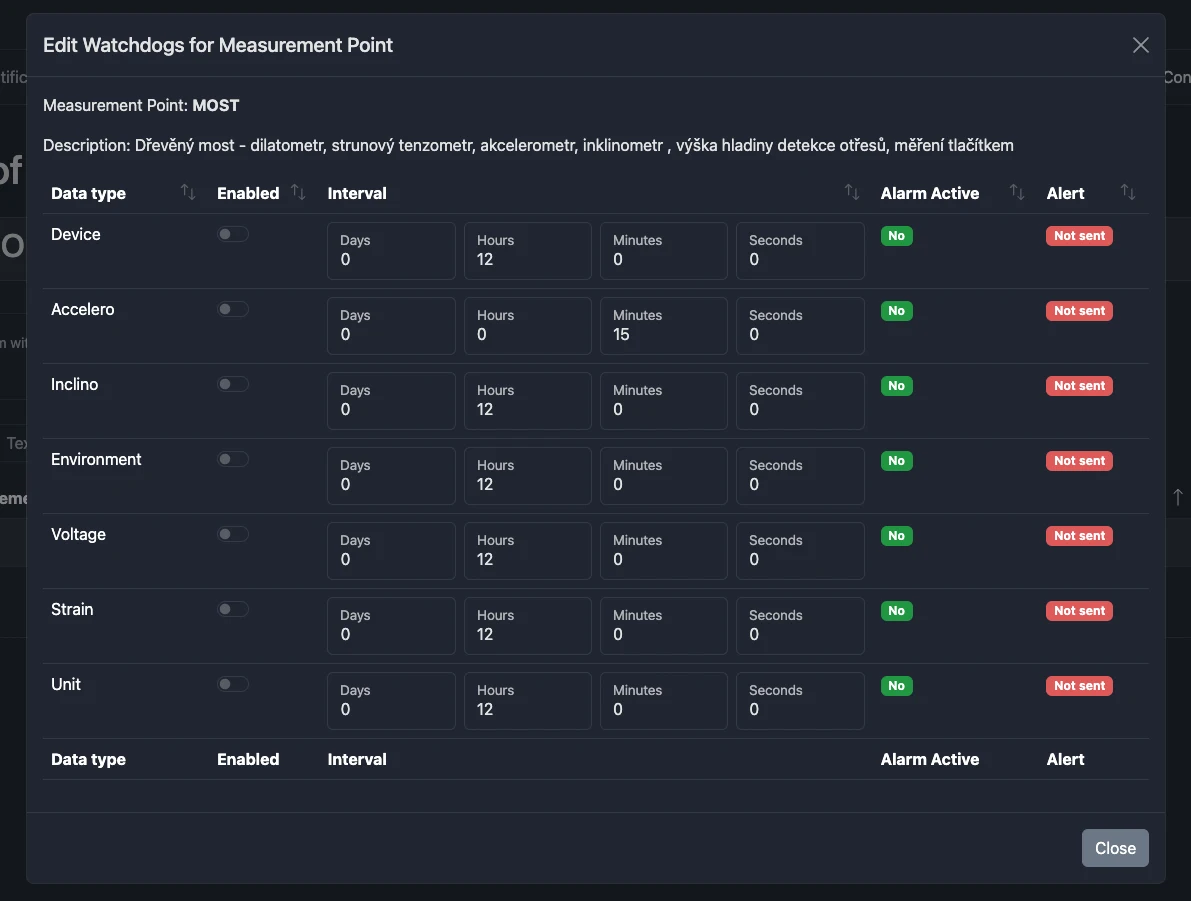
Open the Watchdogs dialog from a Measurement Point row.
For each available Data Type:
- Enabled: toggle watchdog on/off for that data type.
- Interval: set the threshold period (e.g., 12 hours). If no data arrives during this span, the alarm becomes active.
- Alarm active: shows whether the alarm is currently active.
- Info sent: whether a notification was already sent for the current alarm window.
tip
Start with longer intervals on low‑frequency sensors to avoid noisy alerts. Tighten thresholds once you confirm expected sampling cadence.
Behavior
- Alarm evaluation happens server‑side.
- The table of MPs flags active alarms; use Alerts to ensure someone gets notified.